This is a translation from Japanese of an article published by ITmedia on March 3, 2014. All rights reserved by ITmedia Inc. 2014.
Are You Surrounded by Screens? Have You Taken Steps to Address Eye Strain?
In recent years, many people find themselves spending increasing amounts of time staring at screens. In addition to televisions and personal computers, smartphones and tablets have surged in popularity, making screens an inseparable part of our daily lives.
While information technology has made our lives more convenient, the resulting eye strain from constant screen use has become a growing social issue. If you feel strain in your eyes, neck, or shoulders, it is vital to address it properly rather than ignoring it. Neglecting these symptoms as they worsen can harm both your mental and physical health.
Issues related to screens and eyes are known by various names, such as Computer Vision Syndrome (CVS), Visual Display Terminal (VDT) Syndrome, and Technostress Ophthalmopathy. These problems are often unavoidable, especially when using a computer. However, by trying different mitigation methods, you can undoubtedly enjoy a more comfortable digital life and improve your productivity at work.
Eye Strain Makes It Difficult to Keep Looking at the Screen
We have gathered a list of ten essential points to address eye strain. We recommend checking the points that catch your attention first, then reading through the entire list.
10 Ways to Address Eye Strain from Screens
Check your computer workspace environment.
Check your posture when looking at the screen.
Get enough rest and perform stretching exercises.
Re-examine your glasses and contact lenses.
Review your screen brightness settings.
Reduce screen flicker.
Reduce blue light emissions from your screen.
Change your daily lifestyle habits.
Consult an ophthalmologist early.
Use a monitor specifically designed to address eye strain.
[Point 1] Check Your Computer Workspace Environment
Have you ever been on a train where sunlight hit your book from behind, making it hard to read, or hit your smartphone screen, creating a glare? Poor lighting conditions can happen while using a computer without you noticing.
The light reflected from the screen increases eye strain. While glossy screens offer vivid colors, they reflect ambient light. For daily computer use, a non-glare (matte) LCD screen is much easier on the eyes. If your current screen is reflective, you can apply a low-reflection protective film. It is also important not to make the room light too bright; excessive contrast between the screen and the room lighting is undesirable.
[Point 2] Pay Attention to Your Body Posture
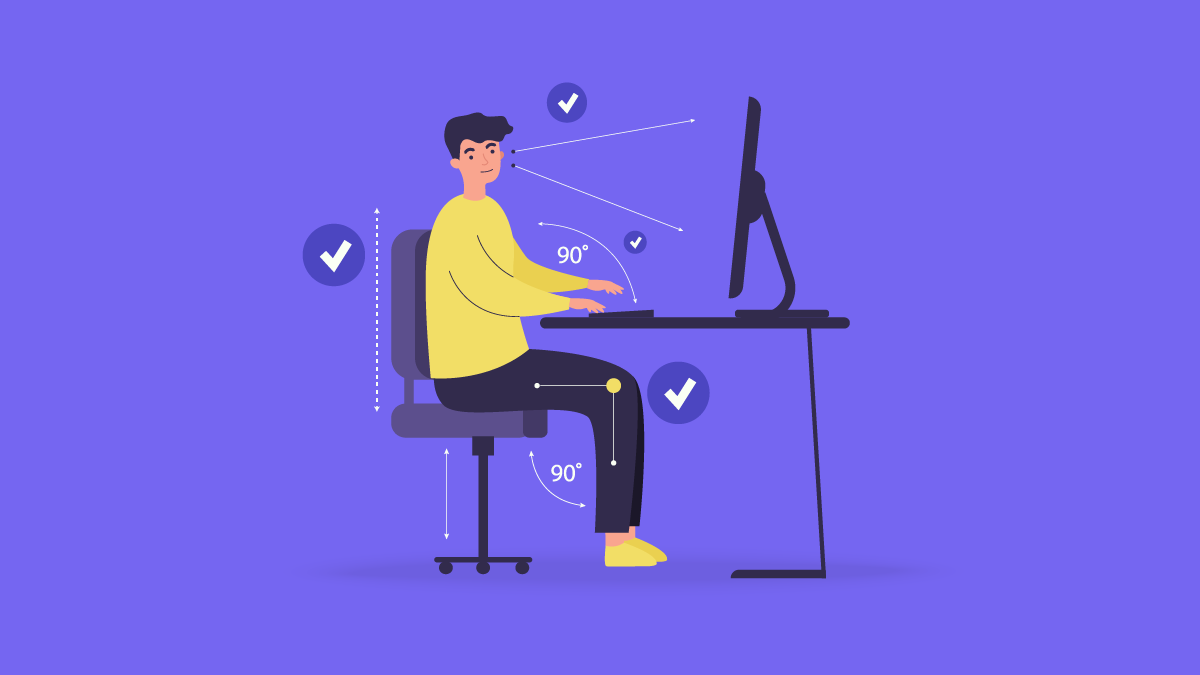
The ideal posture for computer work involves several key factors:
Distance: Keep a distance of at least 40 cm (or 50 cm for wide screens). If you are closer than 30 cm (the length of an A4 sheet), you are too close.
Line of Sight: Your line of sight should be straight ahead or tilted slightly downward. Looking up at a screen can cause dry eyes.
Seating: Sit straight using the backrest, with your feet flat on the floor. This relieves pressure on your neck, shoulders, and lower back.
[Point 3] Proper Rest and Stretching
Even with a perfect setup, working in the same position for long periods is harmful. Focusing on a fixed distance leads to a decline in the eyes' ability to adjust focus.
The 1-Hour Rule: Take a 10–15 minute break every hour.
Look Away: Look at a distant object and move your eyes in all directions to reset your focus.
Avoid "Digital Breaks": Looking at your smartphone during a break does not rest your eyes. Instead, stand up, walk, and stretch.
[Point 4] Re-examine Your Glasses and Contact Lenses
Vision changes gradually. If you have used the same prescription for years, your vision may have shifted, causing headaches or strain. You should have your eyes checked at least once a year to ensure your prescription is still accurate.
[Point 5] Review Your Screen Brightness Settings
Screen brightness should be adjusted based on the room's lighting. A simple trick: place a white piece of paper next to the screen. Adjust the screen brightness until it matches the brightness of the paper under the room's lights.
[Point 6] Reduce Screen Flicker
Many modern LED backlights use Pulse Width Modulation (PWM) to control brightness by flickering the LED at high speeds. This can cause invisible "flicker" that leads to eye strain. Choosing a monitor with DC (Direct Current) dimming or hybrid systems (like EIZO's EyeCare Dimming) can eliminate this problem.
[Point 7] Reduce Blue Light Emissions
Blue light (400-500 nm) is high-energy visible light that can cause strain.
Lower Color Temperature: Changing from 6500K to 5000K can reduce blue light by 20%.
Software Modes: Many monitors now include a "Paper Mode" or "Blue Light Filter" that adjusts the screen to warmer tones, making it easier to read text-heavy documents.
[Point 8] Change Your Lifestyle Habits
Reducing computer and smartphone use before bedtime is crucial. The light from these screens inhibits sleep. If you must read before bed, consider an E-ink reader that doesn't emit direct backlight.
[Point 9] Early Check-up with an Ophthalmologist
If symptoms persist despite these measures, consult a professional. This can help with the early detection of serious issues like glaucoma and provides you with expert advice to improve your workplace environment.
[Point 10] Use a Specialized Monitor
If you have tried everything else and the strain remains, the issue may be the hardware itself. High-quality monitors, like the EIZO FlexScan EV series, automate many of the points mentioned (auto-brightness, flicker-free, and flexible height adjustments), making it easier to maintain a healthy workspace without constant manual adjustment.
Conclusion: Multiple Measures Are Necessary
Addressing eye strain requires a multifaceted approach. While it is easy to forget these habits during a busy workday, investing in the right tools and hardware can automate eye protection. Whether at home or in the office, protecting your eyes is an investment in your long-term health and productivity.